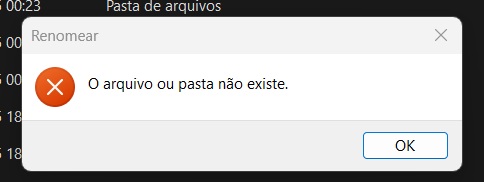
I can’t rename any folders or files.
Appear a message like: " The file or folder does not exist."
Hi, @Eduardo_Marcon
Please compress the log folder below and send it to support@raidrive.com.
- C:\ProgramData\OpenBoxLab\RaiDrive Mount\log
If an error occurs when compressing the log folder, copy the log folder and then compress the copied folder.
Please provide a more detailed description of the error, including the error message and the error screen.
Also, please capture the drive settings screen and send it to us.
RaiDrive Support
I just sent the email.
Thank you.
I reviewed the log and found no errors.
This usually means you don’t have Rename permission, or the target file or folder doesn’t actually exist.
Please update to the latest version (RaiDrive Mount 2025.12.0) and test again.
(There have been many changes due to recent OneDrive policy changes.)
If the issue persists or if Rename works successfully on the OneDrive webpage, please capture the screen captures of the successful and unsuccessful sections and email them to me.
If you can create a video, please send it to me.
Thank you,
RaiDrive Support
Hello.
I sent a screenshot and two videos by email showing that it works on the web version of OneDrive, but not on the RiverDrive version 2025.12.0.
Since we are unable to trace the cause of the issue, we are sending you a version with detailed logs via the link below.
This version does not resolve the issue.
It’s intended for root cause tracking.
Please use the distribution version for actual use after testing.
When reverting to a previous version, you will need to uninstall and reinstall the previous version, so please keep the drive list using the Export/Import function.
If an error occurs when renaming, please provide the full path to the file.
Please also compress the log folder and send it to us.
If the compressed file does not contain service.log, copy the entire log folder and then compress it.
RaiDrive Support
I suspect it’s something wrong with my account because if I connect another OneDrive account, I can rename it normally. I’m connecting with my main account, not a shared one. Honestly, I don’t understand what could be happening.
Thank you for testing and sending us the logs.
There’s something odd about this, so we need more detailed analysis.
Although it may be a hassle, please reinstall and test using the link below.
Please send us the logs again, and we’ll analyze them and let you know the results.
RaiDrive Support
Hello.. using the version 2025.12.7.12 still the same error.

Cant rename files and folders.
This version does not address the issue, but rather provides more detailed tracking.
Please zip the log folder and email it to us.
Hello. I just sent the log.rar file via email for analysis. Thank you.
Thank you for sending the log.
It’s very strange that the MS server returns “No Content” when requesting Rename.
This return is neither documented nor reported.
It could be a characteristic of some servers, or it could be a characteristic of the account or file.
I’ll send you a version that handles this return.
https://app.raidrive.com/download/raidrive.mount/nightlybuild/RaiDrive.Mount_2025.12.8.128_x64.msi
Please send me the log, along with the results, whether successful or unsuccessful.
RaiDrive Support
When a “No Content” message was returned for a rename request, we checked the information remotely, but the name still remained unchanged.
This is almost certainly a problem with the MS server.
However, we are sending you a test version that includes the ability to perform multiple remote checks. (This may result in a longer rename time.)
https://app.raidrive.com/download/raidrive.mount/nightlybuild/RaiDrive.Mount_2025.12.10.129_x64.msi
After testing, please send us the log file along with the results.
If the rename failed, please check the OneDrive homepage to see if the name has been changed and let us know.
Also, if possible, please test the ability to move to a different folder.
We apologize for any inconvenience.
RaiDrive Support
Hi, @Eduardo_Felipe_Marco, @Eduardo_Marcon
Have you tried testing with the version linked above?
We’re waiting for the results.
Hello. Sorry for the delay. Yes, I tested it with that version; it took a while to show the error, but it gave the same error. I will send the log files by email.
Thank you for sending the log.
The issue still remains unresolved.
The rename request appears to have succeeded, returning NoContent, but I’ve checked remotely with RaiDrive multiple times, and no renamed files have been found.
If the rename fails, could you please confirm whether the rename was actually successful on the OneDrive homepage?
We’ve sent you a test version with more detailed information via the link below:
https://app.raidrive.com/download/raidrive.mount/nightlybuild/RaiDrive.Mount_2025.12.12.205_x64.msi
Please send us the log file after verifying the rename.
Have you tested the RaiDrive.Mount_2025.12.12.205 version I sent in the reply above?
I know it’s a bit of a hassle, but I’d appreciate your help.
Sending me the log files would help us analyze the cause and improve the solution.
Hello! I have been following this topic since the issue began in January, as I am experiencing the same problems when renaming or moving files and folders. A similar situation occurred in November 2025, but it was resolved back then.
Now, it seems this issue is dragging on. Personally, I’m sticking with RaiDrive because I like the software, but many of my colleagues have already uninstalled it…; it has been broken for too long and they simply couldn’t work properly with the platform anymore.
From what I can see, the RaiDrive version doesn’t seem to matter, they all fail. I assume this is an issue inherited from OneDrive, specifically regarding the permissions issue others have mentioned.
Do you think this will be resolved eventually? I truly hope you can get OneDrive and RaiDrive working seamlessly together again. I imagine this is a delicate task, so I wish you the best of luck. Thank you for your attention, and I look forward to hearing from you soon.
Aqui nada foi resolvido. Estou usando ainda o Raidrive mas não estou mais usando o Onedrive.
Me parece ser algo realmente do onedrive de permissão. Pensei que era só eu que tinha esse problema, pelo visto tem mais pessoas com o mesmo problema.