Not sure if this is possible, but I prefer when during startup I don’t see any windows opened.
But still I would like that raidrive is running in the background or minimized on startup. Currently after startup, a raidrive window opens, which I don’t really want to see every time my pc turns on.
So is there a way for me to enable it, because I tried few things, and nothing seems to work.
I never really noticed that, but now that you say it, Raidrive indeed has the main window opened at startup, even if this isn’t really necessary anymore when everything is configured properly and works fine for months.
+1 to that. There should be a “start minimized” option to reduce by default Raidrive’s window into the system tray.
We WANT Raidrive to start with Windows. So “Register to Startup” stays ticked.
We DON’T want Raidrive’s window to pop-up when Windows starts. We’d have liked an option to :
start with windows BUT minimized as an icon in the system tray
By default, RaiDrive is supposed to run in the background at system startup. If you’re seeing the RaiDrive window, it’s probably because something got screwed up somewhere.
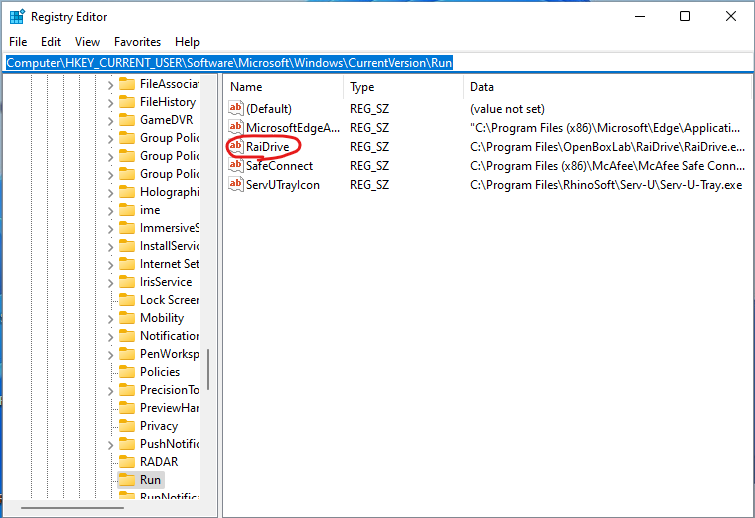
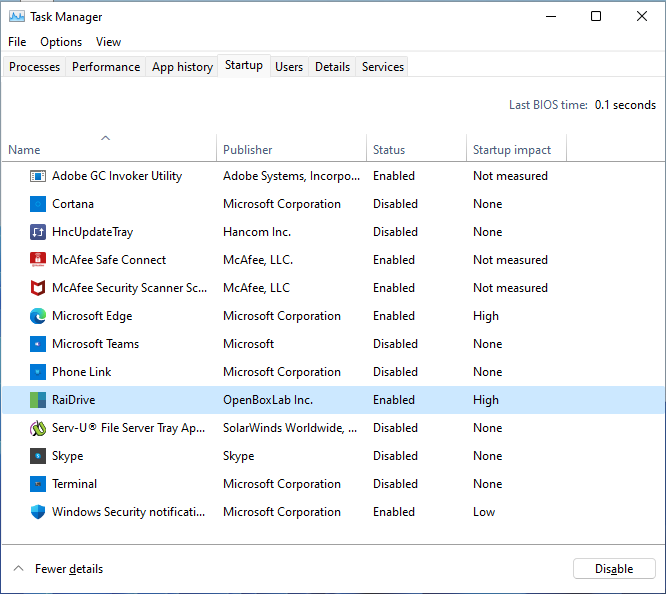
First, you need to go to your startup program settings and make sure you have multiple RaiDrive registered. If you have multiple RaiDrive registered in your startup program, you need to go to the address below and delete everything related to RaiDrive.
If you have uninstalled RaiDrive from the two paths above, try unchecking Register to Startup in Settings within the RaiDrive client, checking it again, and rebooting to see if this resolves the issue, and let us know your results.
First, please go to the Startup Programs tab in the Task Manager and capture RaiDrive as shown below and email(support@raidrive.com) it to us.
We’ll check it out and get back to you.