Normally, when you right click any file, a context menu will pop up. There you will see the RaiDrive Quick Delete option.
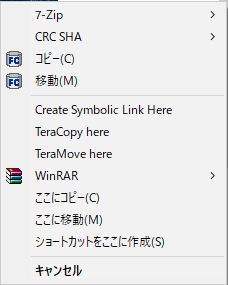
However, for the quick moving/copying, those menus are not existing as shown below when you drag files using right click.
Actually, I have see those move/copy in the context menu before. But not sure why, sometimes they appear, sometimes they don’t.
Now then I am not sure whether copying/moving process that is undertaken is actually the fast copying/moving feature by RaiDrive or simply the standard windows copy/move.
As a result of testing with Google Drive internally, the RaiDrive Quick Copy menu appeared normally when dragging and copying the file with a right mouse click.
You may need to update your RaiDrive to the latest version.
If the phenomenon continues after the update, please tell us again.
RaiDrive Quick Move does not support moving from a local disk to a remote drive.
It is only displayed in the context menu when moving files within the same drive.
Now I understand.
I investigated a little further as to why those menus did not appear earlier.
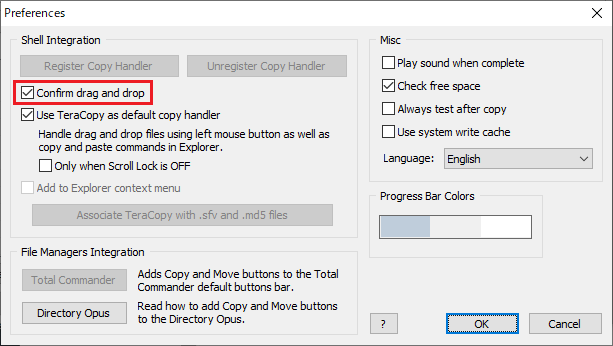
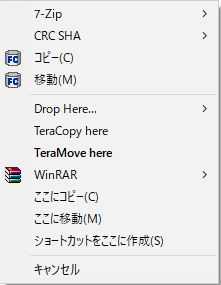
And I found that in TeraCopy program, if I check the “Confirm drag and drop”, this is to always pop up another menu to choose to copy with TeraCopy or Standard Windows Explorer,
then after choose “Explorer”, those menus appear properly.
However, if I uncheck the “Confirm…”,
Those menus now disappear.
Could you please investigate this??
Because normally this box is unchecked, so that TeraCopy will always be used for Copy/Move. But only when I want to copy to cloud drives, I will use right mouse click to drag the files in order to choose either RaiDrive Quick Copy or Standard Explorer Copy.